
When is my target well placed?
A year-at-a-glance table shows which month and hour a deep-sky target rides high in a dark sky. One tap opens the night curve with the Moon and a quick rating.
The two views

Reading the table
- Number = altitude of the target above the horizon (degrees) at that hour.
- Colour green → yellow → red: higher is better.
–= below the horizon. - Blue-grey cells: Sun still above −12° → sky not truly dark.
- Red line: the month where the target culminates highest at astronomical midnight.
- Pick catalogue & target and your location below the table.
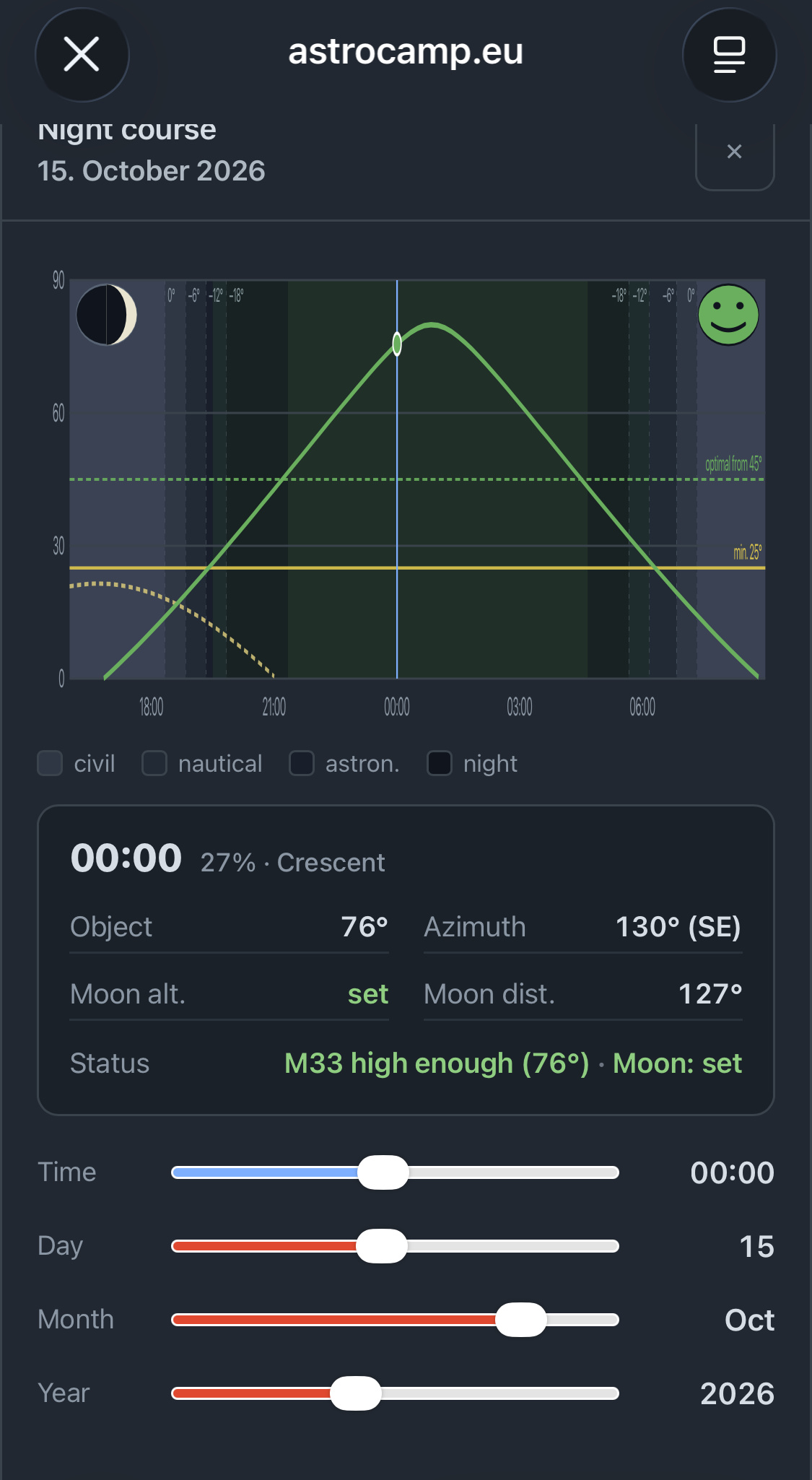
Night curve & rating
The green curve is the target altitude over the night. Two lines mark your thresholds: yellow = minimum altitude (below = too low), green = optimal altitude (above = ideal). The dashed curve is the Moon; the dark bands are twilight stages.
The smiley sums up the current moment. It always takes the worst single factor — altitude, twilight or Moon — so nothing is glossed over:
The status line names target and Moon separately, e.g. M33 high enough (64°) · Moon: set
The maths behind it
Altitude & azimuth
Date and time give the Julian Date and from it the sidereal time (GMST). With the hour angle H = sidereal time + longitude − right ascension, the altitude follows straight from spherical trigonometry:
Sun, twilight & culmination
The Sun’s position uses the standard series for ecliptic longitude (mean longitude + equation of centre). Twilight follows the Sun’s altitude: 0° sunset, −6° civil, −12° nautical, −18° astronomical. “Astronomical midnight” is the Sun’s lowest point — where the tool looks for best culmination.
Moon: phase & distance
The Moon’s position uses a truncated lunar series (≈1° accuracy). The illuminated fraction follows from the Sun–Moon elongation ε:
Interference weighs Moon altitude, brightness and the angular distance to the target (law of cosines). Below the horizon the Moon counts as harmless.
Every threshold — minimum & optimal altitude, Moon distance & brightness — is configurable in the plugin settings.